
Best Mail Server5.261 - Download
You'll be able to download in few seconds.
Publisher Description
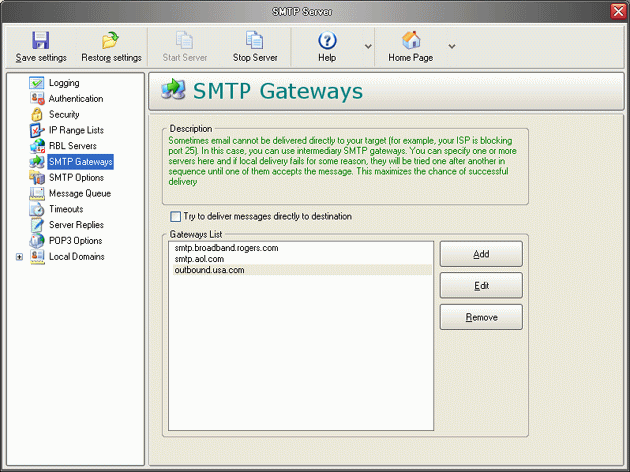
Best Mail Server is an ultra fast mail server program. You can send mail from any mail client that is complaint with SMTP protocol using this server. You can also configure it to be your local mail server. It will accept mail on behalf of your users and store it, until your users will retrieve it using POP3. Our main purpose in developing this server was to deliver the easiest possible configuration, while allowing you to be able to tweak any advanced features you want. This server can be used along with virtually any mailer or email program. It is simple, light-weight, powerful and absolutely bullet-proof. A lot of security features and options that allow you to protect the server from DDoS attacks as well as safely block SPAM and spammers are built into the server. SMTP and POP3 servers work as NT services therefore they will keep working in the logoff mode. You can have multiple SMTP gateways in your server if you travel a lot with your laptop. This way, even if you cannot deliver your email directly to the destination, you will be able to still send it using one of the gateways. We also created mailing lists functionality in the server. Using this feature you can actually use this server as a mass mailer. You can create as many parameterized mailing lists as you like.
About Best Mail Server
This Mail Servers program is available in English. It was last updated on 29 September, 2026. Best Mail Server is compatible with the following operating systems: Windows.
The company that develops Best Mail Server is Ixis Ltd. The latest version released by its developer is 5.261.
The download we have available for Best Mail Server has a file size of 13.6 MB. Just click the green Download button above to start the downloading process. The program is listed on our website since 2013-11-21 and was downloaded 0 times. We have already checked if the download link is safe, however for your own protection we recommend that you scan the downloaded software with your antivirus. Your antivirus may detect the Best Mail Server as malware if the download link is broken.
How to install Best Mail Server on your Windows device:
- Click on the Download button on our website. This will start the download from the website of the developer.
- Once the Best Mail Server is downloaded click on it to start the setup process (assuming you are on a desktop computer).
- When the installation is finished you should be able to see and run the program.
Program Details
System requirements
Download information
Pricing
Version History
version 5.261
posted on 2013-11-21
Major bug fix
version 2.44
posted on 2007-05-16
Disclaimer
External Download
We do not host Best Mail Server on our servers. We did not scan it for viruses, adware, spyware or other type of malware. This app is hosted by the software publisher and passed their terms and conditions to be listed there. We recommend caution when installing it.
The external download link for Best Mail Server is provided to you by apps112.com without any warranties, representations or guarantees of any kind, so access it at your own risk.
If you have questions regarding this particular app contact the publisher directly. For questions about the functionalities of apps112.com contact us.
